Friday, 28 November 2014

"I don't want this publication showing on my staff profile ..."

As staff get accustomed to using the new Repository, one issue you may find is that you've created a record in the Repository that you don't want to appear in your staff profile page. This is where it's important to understand how the different system interact.
The Repository as it stands performs two separate-but-linked functions:
  • it provides a structured database for making details of your publications, often including the full text, publicly available at http://repository.liv.ac.uk; and
  • it provides information on publications which is shared with TULIP, from where that information is used in many other systems such as the Portfolio of Activity and, most pertinently here, the Staff Profile pages.
The important concept to understand here is that the Staff Profile pages do not take their information directly from the Repository - they take them from TULIP, and it's simply now the case that entering details via the Repository is what gets those details into TULIP (and provides extra functionality for open access).

There may be cases where you don't want the details of publications you have entered into the Repository to be displaying in your Staff Profile pages. Depending on what you want to do, you have two options:
  • If you want to ensure the item is not publicly available at all, i.e. available through neither the Repository itself, nor your staff profile pages, then when creating the record set its confidential status to "Yes".
The confidential property is the second field in the publication details section. By default it is set to 'no'.
  • If you want to hide the item from your staff profile page but still want it to be publicly available through the Repository itself, leave the confidential status to "no", make a note of the item id number, and then send an email to helpdesk@liverpool.ac.uk with that id number, asking for the item to be hidden from your staff profile.
The easiest way to find an item's ID number is from the URL if you are editing it - it's the number after eprintid, e.g. in the example below, the item with ID 2000000 is being edited.

https://repository.liv.ac.uk/cgi/users/home?eprintid=2000000&screen=EPrint::Edit&stage=core#contributors

If you are just viewing your items, you can find out the item ID by looking at the item in your Author listing on the repository:

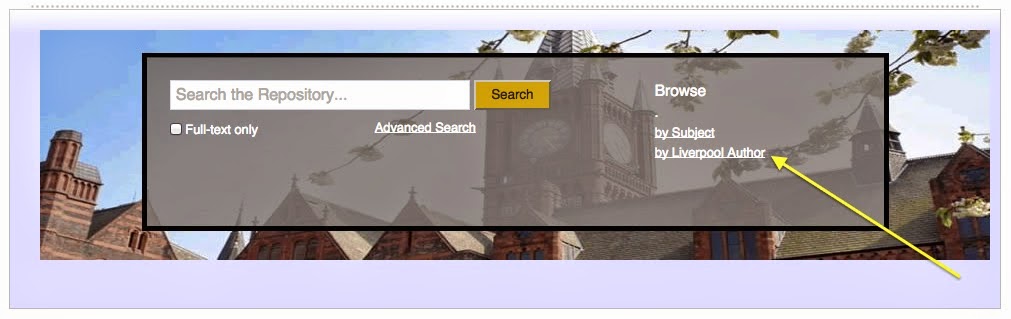
Choose Browse by Liverpool author to find your own author listing
The URL that links from the title of your publication will give you the ITEM ID of your publication.


This is just a temporary measure - upon completion of the separate Staff Profile Pages project, you will be able to use TULIP itself to decide which items do and do not appear on your staff profile.

For clarity, you should also know that any changes you make in the Repository will only be reflected in TULIP and your profile pages the morning after the changes have been made. When the Staff profile Pages project is complete, you will be able to refresh your profile pages on demand.

Wednesday, 12 November 2014

Life after launch - the Repository after its first fortnight

It's a fortnight after the release of the University Repository and we've a good idea now what categories the queries we've received predominantly fall into. We've addressed this issues in a Life after Launch document - http://libguides.liv.ac.uk/loader.php?type=d&id=1268527. This document addresses the common questions we've received in the three areas:
  1. Editing of records (particularly of records imported from TULIP)
  2. Ownership of records
  3. Multiple/Duplicate author names in records
 Though all of these issues have also been addressed elsewhere in this blog, the document brings them altogether in one place.

Tuesday, 28 October 2014

How to tell if a repository record has been imported from TULIP

The previous blog post outlined why it is important not to directly edit or amend (or especially remove) any records in the Repository that have been imported from TULIP (i.e. doing so could cause problems with the other systems, such as Portfolio of Assessment, that take their publications details from TULIP) - but how do you know for sure if a record has been imported from TULIP?

The answer is straightforward - when viewing the record for a specific item, look at the web address. It will be in the form of repository.liv.ac.uk/XXXXXXX, where XXXXXXX is a number. If this number is between 1,000,000 and 2,000,000, this indicates that the record has been imported from TULIP and should not be directly edited.

TULIP and the University Repository; or why you should avoid directly editing imported records


It is useful to understand the link between TULIP and the University Repository, both now and into the future.

Currently, the majority of the records in the University Repository have been imported from TULIP. These records were used in TULIP to populate things like Portfolio of Assessment and staff profile web pages.

These original records are part of the historical record of the University’s output and should not be directly edited or amended. To do so could interfere with processes that audit and monitor those records. Similarly, with newly created records, once that record exists, it is important that the first entry is maintained in its original state.

If you need to make any changes to a record, please create a new version of it as outlined below, then proceed to edit that new version:

1. Create a new version. Whenever you make any changes in the repository, you should always create a new version - this creates a history trail for your item records and allows the proper checking of any changes made both against the usage in other institutional systems (Portfolio of Assessment, Profile pages etc.) and quality checking. First, within manage deposits click the View icon (a piece of paper with a magnifying glass) next to the item you want to change, then click the Actions tab and select New version.


2.  You will see a message to indicate you have successfully created a new version


3. In the actions tab of the item, now select Edit Item for the new version:


4. Change the view to the Details of the Item and make the changes you need as appropriate.

Save your changes - they will then be reviewed and normally the new version will go live the next day (there may be a bit of a delay during the initial repository launch period as many people do this!). When the new version of the record is made live, the old one will no longer appear on the publicly-viewable repository (though it will still remain within the system).

Friday, 24 October 2014

University Repository launched

The University Repository is now available. The University Repository will replace TULIP's function of providing the university's database of research publication details. It will also provide the means to make the full text of research outputs available online.

The following text explains some of the reasons behind this move, and outlines some of the things you can expect, in more detail.


Why are we switching?

The University Repository is specifically designed to store and manage bibliographic data concerning university research outputs, especially publications. You can also store and make available full text versions of your published outputs, a vital requirement to comply with HEFCE and other funders’ open access requirements (see the Open Access LibGuide for more information).

What’s happening to the publications details in TULIP?

These details have been imported into the University Repository. The way publication details have been held previously, coupled with the process of bringing them into the Repository, means that some data will look poor in the Repository; for example, attempts to de-merge long author lists mean author surnames such as de Bolins or van Houten may not display correctly. The most obvious difference will be that often authors will appear twice in a record. This is explained in the following blog post Knowing Me Knowing You. It is important to note this is a result of how data have been previously stored and then imported into the Repository; it is not a “feature” of the Repository, future publications will not exhibit the same inconsistencies, and details can be edited within the Repository. The citations should still display the authors of a publication correctly.

Will details of all my publications be publicly viewable immediately through the Repository?

Yes and no. Those publication details that are currently viewable to other systems via TULIP will be publicly viewable immediately through the Repository. Those details that are in TULIP but currently hidden from other systems will be imported into something called the Review Buffer in the Repository, and will have their confidential status set to yes. In order to make such hidden items available, you will need to log in and return the item to your work area. You will then need to create a new version of the record and make any required edits, including setting the “confidential” status to “no” before placing the item back into the Review Buffer. Library staff can then check the details before the item is made available. In this way we ensure that no matter what the original reason for hiding a publication, they remain hidden until a choice is made by you to change that status. In other words, there is no need to worry that currently hidden records will suddenly become publicly viewable after the switch.

How will this affect things like my staff web page and Portfolio of Assessment?

These systems will continue to take their information from TULIP. The University Repository and TULIP will be linked in such a way that TULIP will mirror publication details entered in the Repository, and so, in practice, you should not notice any difference in your staff web page displays. There are checks in place to ensure that items in the repository cannot be removed (or certain changes made) if they are used in other official systems, such as a Portfolio of Assessment.

What will the University Repository do?

The University Repository will act as the university’s primary location for our published research outputs. Details of journal articles, monographs, conference proceedings and so on will be entered into the Repository either by research staff themselves or administrative staff on their behalf. Once entered, details will be quality checked by library staff before being made publicly available. Library staff will also check that the version of full-text papers uploaded to the repository is the correct one.

How does the Repository relate to open access?

The Repository will be one of our key ways of making publications available on an open access basis. The University’s Open Access policy (due to be considered by Senate in November 2014) requires staff to upload details of journal articles and conference proceedings (i.e. all outputs in publications with an ISSN) and their author accepted manuscript into the Repository within three months of acceptance by a journal. The author accepted manuscript is your own version of the paper incorporating all revisions required by the peer review process, but not including the publisher’s own formatting. This will be required to meet the HEFCE’s policy on open access and the next Research Excellence Framework. For clarity, this form of open access is often referred to as Green open access and author self-archiving.

How do I get publications details into the Repository?

A full guide to uploading publications into the Repository is available. In summary, there are two main ways of entering publication details:
  • manually, that is by typing them in; and
  • by import, that is by importing details from sources such as DOIs, PubMed IDs, or EndNote libraries.

Who should I contact if I have a question not answered here?

Please send your enquiries to irhelp@liv.ac.uk. Your question will then be answered or forwarded to someone else for an answer as appropriate.

Wednesday, 22 October 2014

Knowing Me, knowing you . . .

When you examine the information imported from TULIP into the repository, you will notice an odd thing - there will tend to be University of Liverpool staff in the entry listed twice.

This came about because of the way the information about a publication was stored in TULIP. It was not possible to reliably tell which of the staff who had administered (created, edited, etc.) the record were part of the citation list.

In order to address this issue, the records were imported with both sets of users attached. However, administrative users (i.e.e anyone who created or edited the record) are a special user type which means they do not appear in the automatically generated citation for that item. If you wish to clean up the contributor records of you items the repository, it is necessary to perform the following steps on each record:

Create a new version - whenever you make any changes in the repository, you should always create a new version - this creates a history trail for your item records and allows the proper checking of any changes made both against the usage in other institutional systems (PoA, Profile pages etc) and Quality Checking.


 You will see a message to indicate you have successfully created a new version


In the actions tab of the item, now select Edit Item for the new version:


Change the view to the Details of the Item:


Change the contributor type of UoL authors as appropriate (this will mostly be to 'author') and remove (just delete the information) the authors that are duplicates:


Save your changes - they will then be reviewed and normally the new version will go live the next day (there may be a bit of a delay during the initial repository launch period as many people do this!)

Friday, 25 July 2014

The old in and out . . . .


As well as using the institutional repository to manage your official record of outputs for things like REF and PDR, you will often want to utilise other reference management formats, in citing your work while writing, or importing records from other systems. 

The repository can accommodate a large number of these, with a couple available at launch and more developed over time. Initial requirements for the repository identified DOI and PubMed as the key online sources and EndNote and BibTeX as the key bibliographic formats. DOI and PubMed are available on the Sandbox now. Work is proceeding well on EndNote and BibTeX, which require modifications to work with our unusual repository structure (c.f. Behind The Curtain)  

Let us know in the comments below if they are working for you and what additional sources / formats you would like to see available.